 Feature
Zoho CRM
Four editions from $14 to $52 per user with forecasting and workflows at the bottom tier, a free edition for 3 users, and a pricing page that leaves the limits to another table
Scored on the published rubric, from documentation, pricing and verified user reports.
Best for: Sales teams of 3 to 50 that want forecasting, workflows and multiple pipelines at the lowest per-user price in the cluster, and that may grow into the wider Zoho suite rather than buy a second vendor.
Verdict
Zoho CRM is the price leader in this duel cluster and it earns the label on the published numbers rather than on a promotion. This is a documentation review: scores come from Zoho's CRM pricing page checked October 10, 2026, not from staged demos. The free edition covers 3 users forever. Standard is displayed at US$14 per user per month and already includes workflows and assignment rules, AI agents, cadences, reports and dashboards and sales forecasting, which Pipedrive holds to Growth at $24 and HubSpot holds to Professional at $90. Professional at $23 adds CPQ, blueprint process automation, email intelligence and inventory. Enterprise at $40 adds the Zia AI assistant, territory management, journey orchestration, custom functions and portals. Ultimate at $52 raises limits and adds consulting. The page notes yearly plans save up to 34%; the monthly rates were behind a toggle this read did not capture. A 10-person team on Standard pays $1,680 a year by our arithmetic, the lowest figure in this cluster for a tier with forecasting. The weak rounds are onboarding and support: no trial length is printed, the per-edition limits for workflows, fields and storage live on a separate comparison page, and paid support beyond Classic has no price on this page. Buy it for the arithmetic. Budget time for the setup.
Visit Zoho CRM
We have no affiliate relationship with this vendor. Link goes to the official site.
Where it is strong
- Standard at the displayed US$14 includes workflows, assignment rules, cadences, forecasting, reports and dashboards, and AI agents
- Free edition for 3 users with no time limit
- No contracts: the FAQ states Zoho CRM is pay-as-you-go monthly or yearly and plans can be changed any time
- Four published editions with the top tier at $52, so the full ladder is visible without a sales call
- Classic support is included on every paid edition, with paid plans available for faster response
- Payment by card, PayPal, and bank or cheque transfer for yearly subscriptions
Where it falls short
- The pricing page does not print a trial length, only 'Start free trial' buttons
- Per-edition limits for workflow rules, custom fields, modules, storage and records are not on the pricing page; the page links to a separate comparison
- Monthly billing rates sit behind a toggle; the page states yearly saves up to 34% but this read captured the displayed figures only
- Paid support plans and team user licences are mentioned without prices
- Local taxes (VAT, GST) are charged on top of the listed prices, per the footnote
At a glance
| Starting price | US$14/user/mo (Standard) as displayed; Professional $23; Enterprise $40; Ultimate $52 |
|---|---|
| Pricing note | Free for 3 users; from US$14/user/mo on Standard as displayed, with the page's yearly toggle noting up to 34% savings (pricing page, checked October 10, 2026) |
| Free plan | Yes: 3 users, leads, deals, workflows, reports and mobile app, free forever |
| Seat minimum | Not stated on the pricing page |
| Trial | Offered on every edition; length not stated on the pricing page |
| Support channels | Classic support on paid editions; paid support plans with faster response and round-the-clock coverage at prices not listed; live chat 24x5 for sales questions |
| Automations | Workflows and assignment rules from Standard; counts not on the pricing page |
| AI | AI agents from Standard; email intelligence at Professional; Zia AI sales assistant at Enterprise; custom ML at Ultimate |
What Zoho CRM actually is
Zoho CRM is the sales application inside a suite of more than forty Zoho products, priced in four editions that climb from essentials to bespoke. The CRM itself handles leads, deals, contacts, accounts, workflows and forecasting; the suite around it handles help desk, campaigns, books, sign and much else, each sold separately or bundled as CRM Plus or Zoho One.
That places it between the two other corners of this cluster. Like HubSpot Sales Hub, it is one piece of a platform. Like Pipedrive, its entry tiers are priced for small sales teams rather than for enterprises. Our all-in-one versus best-of-breed duel frames the trade.
This review scores Zoho CRM on the five fixed rounds used across the site: onboarding, core workflow, integrations, pricing and support. The scoring logic is explained in how a duel is scored. All evidence comes from the CRM pricing page checked October 10, 2026, read in US dollars. No staged demos, no claims of testing we did not do.
Who Zoho CRM is best for
The edition ladder and the suite behind it favour a particular kind of team. Read the list against your own.
- Sales teams of 3 to 50 that want forecasting, workflows and multiple pipelines at the lowest per-user price
- Teams of 3 or fewer that want a CRM for $0 with no deadline
- Companies that expect to add a help desk, email marketing or accounting and would rather buy from one vendor
- Teams with a process that benefits from blueprints and CPQ, which Professional includes at $23
- Teams selling across regions, since Enterprise includes territory management and the page lists 28 supported languages
- Budget holders who want to see the top of the price ladder, $52, without talking to sales
Who should skip it
Three profiles will be better served by one of the other two corners.
- Buyers who need the per-edition limits on the pricing page itself, because Zoho sends workflow, field, module and storage counts to a separate comparison table
- Teams that need printed support hours and a stated trial length before signing, which neither appears on this page
- Teams that want the largest published integration directory, where HubSpot prints 2,000+ and Zoho's CRM page prints no CRM-specific count
What the free edition includes (as of October 2026)
The free edition is described as free forever for 3 users. The pricing page's summary lists leads, deals, workflows, reports and a mobile app as the starter kit.
An earlier read of the same page in another currency listed more detail for the free edition: contact management, follow-up reminders, workflow automation, up to 10 custom email templates, tasks, meetings and calls, import and export with export limited to 10 times, standard reports, 5,000 API calls a day and mobile apps. The US-dollar read did not repeat that list, so this review quotes it as seen on the same page in a different locale and flags that.
For a founder or a 3-person team the free edition is a genuine CRM with workflows, which neither Pipedrive nor HubSpot's free tier matches at that headcount: Pipedrive has no free plan and HubSpot's free tools stop at 2 users.
The limit is the fourth user. At that point the team is on a trial of a paid edition, and the page does not say how long the trial runs.
How the pricing is structured
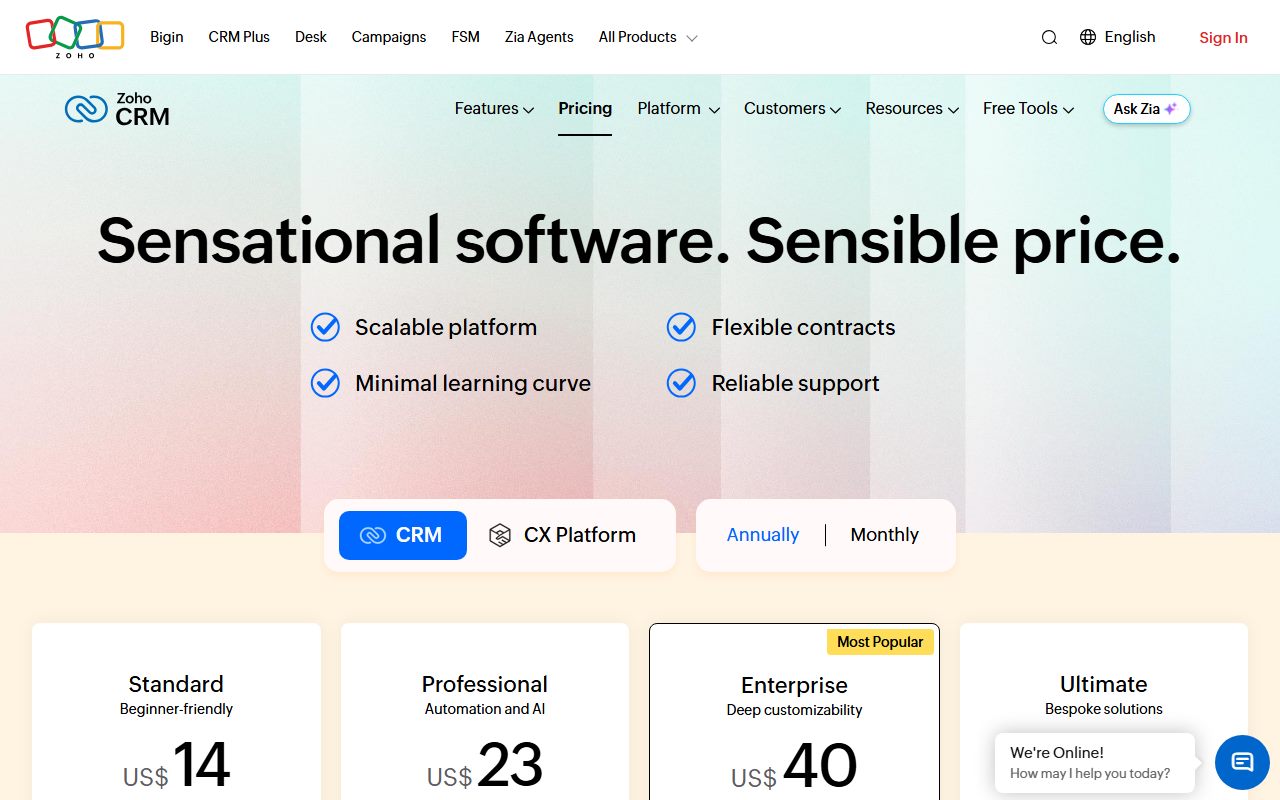
Zoho CRM is per-user pricing with four editions and two billing periods. The page's toggle reads Monthly and Annually with 'save up to 34% with yearly plans'. The US-dollar figures displayed were Standard $14, Professional $23, Enterprise $40 and Ultimate $52 per user per month. This read did not capture the monthly-billing figures behind the toggle, so a buyer paying monthly should read them off the live page. Our annual versus monthly billing duel covers what a 34% gap means in practice.
The FAQ states there are no contracts or commitments, that the service is pay-as-you-go monthly or yearly, and that plans can be switched at any time from the Home page. Payment is by Visa, Mastercard, American Express or PayPal, with bank or cheque transfer accepted for yearly subscriptions.
Two add-on lines appear without prices. Team user licences, a reduced-access seat for non-sales staff such as marketing, support or finance, are bought from the Zoho Store add-ons page. Paid support plans with faster response and round-the-clock coverage are described without a figure.
The page also prices CRM Plus, the bundle that adds help desk, campaigns, social, surveys and projects: Starter at $20 per user per month and Enterprise at $57. A sales team that knows it will buy a help desk should price CRM Plus Starter against CRM Standard plus a separate desk tool.
A footnote states local taxes such as VAT and GST are charged on top of the listed prices. No seat minimum appears. Our shared-login versus seat-per-person duel is relevant because the team user licence is Zoho's answer to the shared-login temptation.
What sits behind each edition
Standard at $14 lists workflows and assignment rules, AI agents to automate sales activities, cadences for multichannel follow-up sequences, custom reports and dashboards, sales forecasting and self-service kiosks for no-code custom screens. An earlier read in another locale also listed email integration, built-in calling, multiple pipelines, custom modules and Slack, Zoom and Teams integrations at this tier.
Professional at $23 adds CPQ with product matching and price rules, email intelligence with AI summaries, intent and sentiment analysis, blueprint process automation, widgets that pull third-party data, inventory management covering invoices, sales and purchase orders, products and vendors, and Google Ads integration.
Enterprise at $40 adds the Zia AI sales assistant for insights, predictions and recommendations, journey orchestration, territory management by product line, geography and vertical, custom functions for low-code cross-app automation, wizards that break long forms into steps, and customer, partner and vendor portals. The earlier locale read also listed multi-team management, custom buttons, approval processes, a developer sandbox, field-level encryption and QuickBooks integration here.
Ultimate at $52 adds enhanced feature limits, consulting to build a bespoke version, migration assistance, custom AI and ML through daily free QuickML calls, and data preparation tools.
What the page does not print is counts: workflow rules per edition, custom fields per module, custom modules, storage per organisation, record limits. The page links to a feature comparison across editions for those. A buyer who needs a number should open that table before choosing.
The seat maths at 2, 5, 10 and 25 people
Editorial calculations from the US-dollar figures displayed on the pricing page as of October 10, 2026, for 12 months, excluding tax, team user licences and paid support. They are not quotes.
- 2 users: Free $0; Standard $336; Professional $552; Enterprise $960
- 3 users: Free $0; Standard $504; Professional $828
- 5 users: Standard $840; Professional $1,380; Enterprise $2,400; Ultimate $3,120
- 10 users: Standard $1,680; Professional $2,760; Enterprise $4,800; Ultimate $6,240
- 25 users: Standard $4,200; Professional $6,900; Enterprise $12,000; Ultimate $15,600
- 10 users on CRM Plus Starter at $20: $2,400, with help desk, campaigns and projects in the bundle
Ease of use: what the onboarding score is built from
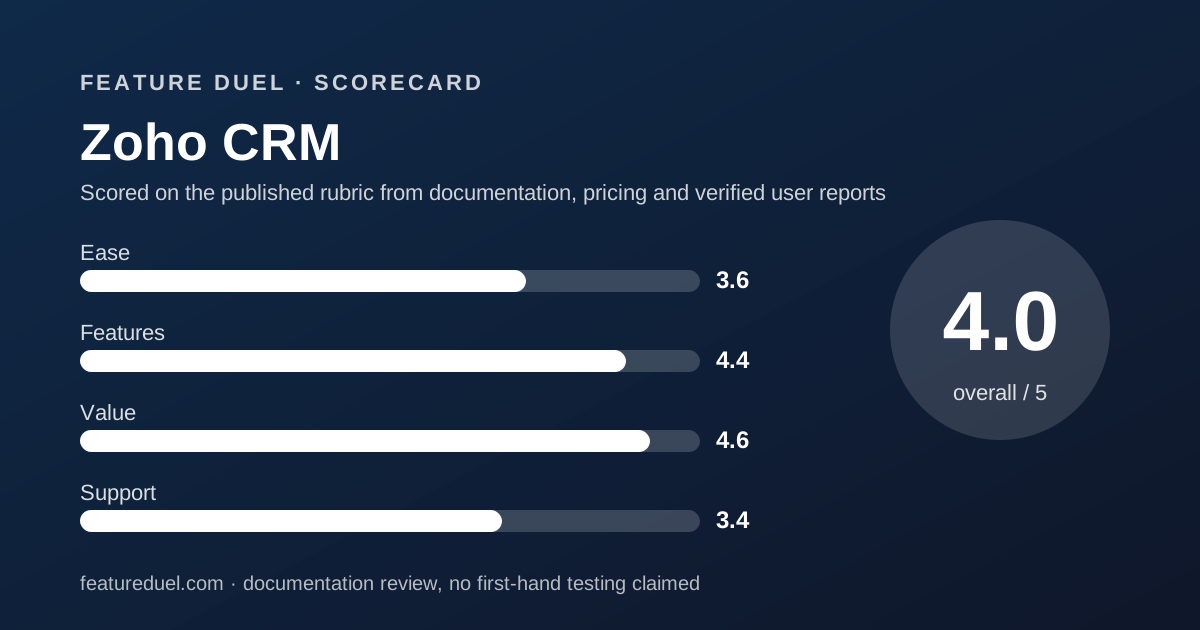
3.6 out of 5. This round scores how much stands between a new account and a working pipeline, from the vendor's documentation. Zoho's free edition for 3 users with workflows is a strong start, and the no-contract terms remove the fear of a wrong choice.
The deductions are for what the page withholds at the moment of decision. No trial length. No per-edition limits on the page. Monthly rates behind a toggle. A demo offered by email as a one-hour session. A team that wants to know whether Standard's workflow count fits its process has to leave the pricing page to find out, and that is friction the other two corners impose less of.
Features: what the core workflow score is built from
4.4 out of 5. The heaviest round, and Zoho's edition ladder is dense. Standard at $14 already carries forecasting, workflows, cadences and dashboards, which is more sales process than Pipedrive Lite at the same price and more than HubSpot Starter's restricted workflows. Professional adds blueprints and CPQ, which neither rival lists below its top tiers.
The deduction is for opacity rather than absence. Without the counts, a buyer cannot tell whether Standard's workflows are five rules or fifty. Pipedrive has the same gap at Growth; HubSpot prints its workflow counts per tier. Capability on paper is the best in the cluster; certainty about it is not.
Integrations: a suite first, a directory second
The CRM pricing page does not print a CRM-specific integration count. The feature lists name Slack, Zoom and Microsoft Teams at Standard in one locale's read, Google Ads at Professional and QuickBooks at Enterprise. Zoho's site navigation claims over 2,900 extensions across all Zoho products, but that figure covers the whole marketplace, not the CRM alone.
The deeper integration story is the suite. Zoho Desk, Campaigns, Books, Sign, Forms and SalesIQ are first-party and share the same account. A team that stays inside Zoho has integrations it never has to configure; a team with a non-Zoho stack has to check the marketplace app by app.
Against HubSpot's printed 2,000+ and Pipedrive's 500+, Zoho's page gives the least to go on. This round is close in the best-CRM guide, and goes against Zoho only because the number is missing.
Value: what the pricing score is built from
4.6 out of 5. The arithmetic drives this score. A 10-person team with forecasting pays $1,680 a year on Zoho Standard, $2,880 on Pipedrive Growth, and at least $12,300 in year one on HubSpot Professional, by our arithmetic from the three pricing pages. No other tier in the cluster puts forecasting and workflows at $14.
What strengthens the score is the published ladder to $52 with no onboarding fee, no credit meter and no contract, and a free edition that covers 3 users rather than 2.
What holds it back is the uncaptured monthly rate, the unpriced team user licence and support plans, and the tax footnote. The score reflects the displayed figures for a team of 5 to 25 on Standard or Professional.
Support: what the score is built from
3.4 out of 5. The pricing FAQ states paid editions get Classic support automatically and may opt into paid support plans for faster response, round-the-clock coverage and dedicated onboarding. Prices for those plans are on a separate page. Live chat for sales questions is 24x5. Setup services exist for SMEs and enterprises through named programmes.
No response time is printed for Classic support, no channels are listed per edition, and the trial length is absent. HubSpot at least splits email from phone by tier; Pipedrive prints phone hours for Ultimate. Zoho's page names a support tier and leaves its contents elsewhere. The deduction is for that.
What verified users report
This review is built from vendor documentation. We have not yet compiled a dated sample of G2, Capterra or Reddit reports for Zoho CRM, and we will not summarise impressions we have not collected. This section will be updated with sourced, dated findings when that sample exists.
The questions worth asking other teams are specific: how long the trial ran, what Standard's workflow and field limits turned out to be, what Classic support's response time was in practice, and whether the yearly discount reached the 34% ceiling on their invoice.
Limits stated by the vendor
From the pricing page, checked October 10, 2026, in US dollars: free edition 3 users; editions at $14, $23, $40 and $52 per user per month as displayed; yearly saving up to 34%; CRM Plus at $20 and $57; 28 supported languages; local taxes charged on top; demos as one-hour web sessions; sales live chat 24x5.
Not stated on the pricing page: trial length, monthly-billing rates (behind a toggle in this read), workflow rule counts, custom field and module counts, storage and record limits, team user licence price, paid support plan prices, Classic support response times, an integration directory count for the CRM, and a seat minimum. The page links to a cross-edition comparison for the counts; open it before buying.
Alternatives
Two products overlap with Zoho CRM enough to be duelled directly.
Pipedrive
Choose Pipedrive if you want a pipeline-first product with annual totals printed per seat and no suite to grow into, and you will pay $24 for Growth to get email sync and sequences. Otherwise choose Zoho CRM if $14 with forecasting and workflows is the better arithmetic and you can accept finding the limits on a second page.
HubSpot Sales Hub
Choose HubSpot Sales Hub if marketing already runs there, if you want the largest printed integration directory, or if you will fund Professional for its sequences and call intelligence. Otherwise choose Zoho CRM if the same shared-database idea at a fraction of the price is the point. The Pipedrive versus HubSpot duel shows how the other two corners score against each other.
Bottom line
Zoho CRM wins the pricing round of this cluster outright: $14 per user with forecasting and workflows, $1,680 a year for 10 people by our arithmetic, a free edition for 3, no contract, no onboarding fee, and a visible ladder to $52. On capability per dollar nothing here is close.
It loses onboarding and support because the page keeps its trial length, its limits and its support terms elsewhere. If you will do the reading, buy it. If you want the numbers on the card, read the Pipedrive review. All figures from the pricing page checked October 10, 2026.
Buy it if
- You want forecasting and workflows at the lowest per-user price in the cluster, which Standard delivers at the displayed $14
- Your team is 3 or fewer and wants a CRM for $0 indefinitely
- You expect to add help desk, email marketing or finance tools later and would rather stay with one vendor's suite
- You want the full price ladder visible, from $14 to $52, without a sales conversation
Skip it if
- You need the per-edition limits before you buy, since the pricing page sends you to a separate comparison table for workflow, field and storage counts
- You need printed support hours and a trial length on the page, which Zoho does not provide
- You want the largest integration directory, where HubSpot prints 2,000+ apps and Zoho's CRM page prints no CRM-specific count
Frequently asked
Is Zoho CRM free?
Yes, for up to 3 users. Per the pricing page checked October 10, 2026, the free edition is free forever and includes leads, deals, workflows, reports and a mobile app. Paid editions start at Standard, displayed at US$14 per user per month, with a free trial whose length the page does not state.
How much does Zoho CRM cost for 10 people?
On Standard at the displayed US$14 per user per month, 10 users cost $1,680 for 12 months by our arithmetic. Professional at $23 is $2,760, Enterprise at $40 is $4,800 and Ultimate at $52 is $6,240. These are editorial calculations from the displayed figures, not quotes; the page notes yearly billing saves up to 34% against monthly without itemising the monthly rate.
What is the difference between Zoho CRM Standard and Professional?
Professional at $23 adds CPQ with price rules, email intelligence with AI summaries and sentiment, blueprint process automation, widgets for third-party data, inventory management with invoices and purchase orders, and Google Ads integration. Standard at $14 already includes workflows, assignment rules, cadences, forecasting, reports, dashboards and AI agents.
Does Zoho CRM require a contract?
No. The pricing FAQ states you are not bound by any contracts or commitments, that Zoho CRM is a pay-as-you-go service billed monthly or yearly, and that you can change your plan whenever you need to by using the Upgrade link on the Home page.
Is Zoho CRM cheaper than Pipedrive and HubSpot?
At the entry paid tier, yes. Zoho Standard is displayed at $14 with forecasting and workflows; Pipedrive Lite is $14 without email sync and Growth is $24; HubSpot Starter is displayed at $7 and $20 with restricted workflows. For 10 users with forecasting, Zoho Standard at $1,680 a year is the lowest total in the cluster by our arithmetic.
What support does Zoho CRM include?
Classic support comes with every paid edition, per the FAQ, and paid support plans promise faster responses, round-the-clock coverage and dedicated onboarding at prices not listed on the pricing page. Sales questions can go to live chat 24x5. No response times are printed for Classic support.
Sources
- Zoho CRM pricing page - checked October 10, 2026
- Pipedrive pricing page (for comparison figures) - checked October 10, 2026
- HubSpot Sales Hub pricing page (for comparison figures) - checked October 10, 2026
Update history
- October 10, 2026 - First published from the CRM pricing page as of October 10, 2026, read in US dollars; some free-edition and per-edition feature detail quoted from an earlier read of the same page in another locale, flagged in the text.
Visit Zoho CRM
We have no affiliate relationship with this vendor. Link goes to the official site.