 Feature

SignNow
The cheapest entry in this cluster and the only one that gives away the seat count, charging $8, $15 and $30 a month billed annually for unlimited users while metering 100 signature invites per account per year.
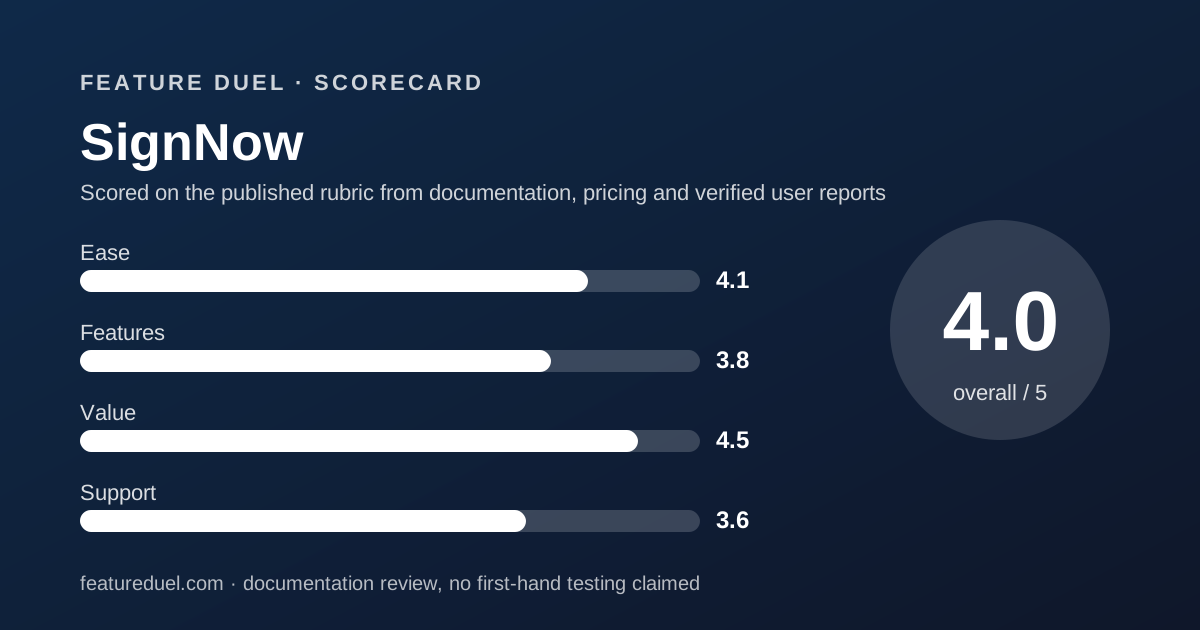
Scored on the published rubric, from documentation, pricing and verified user reports.
Best for: A business where lots of people need an account but only a handful send agreements, and where fewer than two signature invites a week keeps the account inside the 100-a-year allowance.
Verdict
SignNow prices the opposite axis from everyone else in this category and that makes it either the best value here or a trap, depending on one number. Users are unlimited and free on all four plans, so headcount never raises the bill. What is metered is the account's signature invites: 100 a year on annual plans, 10 a month on monthly ones, then pay-as-you-go at a rate the page never names. Two invites a week exhausts the annual allowance by October. This grade comes from a documentation review of the rendered pricing page and its feature grid, not from use.
Visit SignNow
We have no affiliate relationship with this vendor. Link goes to the official site.
Where it is strong
- Unlimited users on every plan, stated four times on the page and marked as a tick in all four grid columns
- The advertised annual savings of $144, $180 and $240 all reconcile exactly against the published monthly rates
- 24/7 live chat and the help centre are ticked on all four columns, including the $8 entry plan
Where it falls short
- The invite allowance is per account rather than per user, so unlimited users share 100 sends a year
- The pay-as-you-go rate for extra invites is not printed; only the Enterprise figure of $1.50 per invite appears
- Single sign-on, full API access and phone support are all Enterprise-only, which puts them behind a quote
At a glance
| Entry plan | Starter $8 a month billed annually, $20 month-to-month |
|---|---|
| Team plans | Professional $15 and Business $30 a month billed annually; $30 and $50 month-to-month |
| Seats | Unlimited users on all four plans at no extra charge |
| Invite allowance | 100 signature invites per account per year on annual plans; 10 per account per month on monthly plans |
| Overage | The plan shifts to pay-as-you-go for extra invites; the rate is not printed on the page |
| Enterprise pricing | From $1.50 per signature invite, with volume discounts and custom invite volumes |
| Pricing note | From $8 a month billed annually with unlimited users included, rising to $20 month-to-month, and 100 signature invites per account per year before pay-as-you-go begins (pricing page, read November 1, 2026) |
| Advertised saving | Save up to 60%, and the printed savings of $144, $180 and $240 all reconcile |
| Trial and refund | 7-day free trial; refund within 30 days of receiving the invoice |
| eIDAS level | SES on Starter, Professional and Business; SES, QES and AES on Enterprise |
What SignNow actually sells
SignNow sells an account allowance, not a licence per person. That single decision explains every other number on its pricing page.
The headline over the cards reads free unlimited users with plans that scale. Each card repeats it. The comparison grid ticks unlimited users in all four columns.
What is scarce instead is the invite. Annual plans include up to 100 signature invites per account per year, and monthly plans include up to 10 per account per month.
So the bill does not grow with headcount. It grows with sending, and only after a threshold. Our rounds are described in how a duel is scored.
Who SignNow suits
The fit is specific and, where it lands, nothing else in this category competes on price.
- A company where twenty people need to see agreements and two people send them
- A franchise or clinic group that wants every location signed in without buying a seat per location
- A business sending one or two agreements a week, which sits comfortably inside 100 invites a year
- A team migrating off another signature tool, since importing documents is ticked on every plan
- A buyer whose template library is large, because templates and storage are both unlimited from the $8 plan up
Who should look elsewhere
Three profiles will hit a wall that the per-seat rivals do not have.
- A high-volume sender, since the allowance is pooled across the whole account rather than per user
- Anyone who needs SSO, full API access or phone support, all three of which read Enterprise-only
- A regulated buyer needing HIPAA support or 21 CFR Part 11, both of which are Enterprise paid add-ons
Round one, pricing: the arithmetic on this page holds up
SignNow takes this round, and it takes it on verifiable arithmetic rather than on the headline.
Each card prints two numbers and a saving. Starter reads $8 against $20 with a saving of $144. Professional reads $15 against $30 with $180. Business reads $30 against $50 with $240.
All three reconcile. Eight dollars across twelve months is $96 and twenty is $240, a gap of exactly $144. The other two pairs work the same way.
The claim of saving up to 60% also checks out, since $8 is 60% below $20. Very few pricing pages in this category survive that test without a footnote.
The safety net is modest but stated. A 30-day money-back badge sits under the cards, and the FAQ narrows it to new or dissatisfied customers within 30 days of receiving the invoice, or to an incorrectly completed invoice.
Renewal is automatic on the last day of the subscription period, monthly or annual, and the page says to cancel before that date. The general trade-off is set out in our annual versus monthly billing duel.
Round two, the allowance: where the cheap plan gets expensive
This is the round that decides whether SignNow is right for you, and it is not close.
One hundred invites a year across the whole account is roughly two a week. A five-person sales team closing one deal each per week exhausts it in the fifth month.
The FAQ is honest about what happens next. The plan seamlessly transitions to a pay-as-you-go model so you keep sending and pay for the extra invites.
The rate for those extra invites is not printed. The only per-invite figure anywhere on the page is the Enterprise starting price of $1.50, which is a volume-discounted rate rather than an overage rate.
The counting rules are also stricter than they look. A declined document still counts as a completed invite, and so does one you cancel before it is signed.
The invite definition is worth reading before you buy
The page spends a full FAQ answer defining the unit, which is more care than most vendors take.
A signature invite is a request to sign a document or a group of documents, sent to one or many recipients. A document group sent to several people at once counts as one invite.
Two rules work in your favour. Opening a document does not count, and merging, downloading, archiving or creating teams do not count either.
One rule works against you. If you share a document through an invite link without restricting forwarding, every completed signature through that link counts as a separate invite.
Round three, core workflow: Starter is thinner than the price suggests
The $8 plan is a sending tool, not a workflow tool, and the grid is clear about it.
Ticked on Starter: unlimited templates, unlimited document storage, legally binding signatures, signing order, audit trail, multi-language signing, auto-reminders, in-person signing, mobile scan and sign, document visibility, merge documents, automatic document expiration, the form library and user management.
Not on Starter: scheduled sending, kiosk mode, shared documents and folders, shared templates, team reports, custom fields, signing links, bulk send, pre-fill fields, remote online notary, drop-down and radio fields, collecting payments, exporting form responses and data residency.
Professional at $15 turns all of those on. Business at $30 then adds custom branding, SMS sending, approval workflows, signer attachments, formula fields, conditional fields, redirect after signing, and password or SMS signer authentication.
Round four, integrations: the useful ones are quoted
The floor is decent. Cloud storage integration, productivity integrations covering Google Docs, Sheets, Gmail, Chrome and Zapier, and a free developer account all read as ticks on every column.
The ceiling is a sales call. Full API access reads Enterprise-only. Business integrations with Salesforce, NetSuite, HubSpot and Microsoft apps read Paid add-on on Enterprise and a dash on all three self-service plans.
That is the sharpest divide in this cluster between the plan a small business can buy and the plan that connects to its systems.
If your CRM is the point of the integration, our Zoho CRM review covers the budget end of that pairing, and our all-in-one versus best-of-breed duel covers whether to make the join at all.
Round five, support: chat on every plan, phone on one
SignNow does better here than its price implies. Help centre access and 24/7 live chat are ticked on all four columns, Starter included.
Phone support and a dedicated customer success manager are Enterprise-only. That is the same split two rivals use, so no one loses ground on it.
There is no stated response time anywhere on the page, which makes the 24/7 claim a channel promise rather than a service level.
For how a dedicated help desk vendor words the same undertaking, see our Freshdesk review.
The Enterprise plan changes the unit, not just the price
Enterprise is the only card on the page without a monthly figure, and that is deliberate rather than coy.
It reads flexible price, $1.50 per signature invite, unlimited users. The card is badged best value, which is an unusual label to hang on the quoted tier.
The model is explicit in the FAQ. Instead of a standard monthly or yearly allowance, the organisation gets a custom invite volume with volume discount pricing.
So Enterprise swaps the subscription for a meter. A business sending 400 invites a year would pay $600 at the published starting rate by our arithmetic, against $360 for a Business subscription that only carries 100.
That crossing point is worth knowing. At $1.50 each, 240 invites cost $360, which is exactly a year of Business, so beyond that volume the quoted tier starts to look like the cheaper door. Both figures are ours, from the page's own numbers.
What the page claims about its own ratings
SignNow prints review figures without always saying whose they are, and we are reporting that rather than filling the gap.
One block reads 4.6 based on 4500+ reviews with a link labelled check 5000+ reviews. It sits between a G2 Crowd badge and a Gartner badge, and the page does not state which supplies the number.
The footer is clearer. Two app store links carry 4.6 from 5.86K ratings and 4.7 from 9.7K ratings, which are mobile app scores rather than software review scores.
The page also carries one named customer quote, attributed to a director of NetSuite operations at Xerox. One testimonial is not a sample, and we have not verified it.
Security and compliance: the badges outrun the plans
The compliance strip lists GDPR, SOC 2 Type II, PCI DSS, 21 CFR Part 11, HIPAA and CCPA. The grid tells a narrower story about which plan gets what.
Ticked on every plan: completion certificate, ISO 27001, SOC 2 Type II and GDPR. The eIDAS row reads SES on Starter, Professional and Business.
Data residency in the US or EU starts on Professional. SMS, phone and password signer authentication all start on Business.
Four rows read Paid add-on and only on Enterprise: qualified electronic signatures, HIPAA compliance through a BAA, 21 CFR Part 11 and the business integrations. The Enterprise eIDAS row is the only one reading SES, QES and AES.
Alternatives worth a side-by-side
Dropbox Sign removes the allowance instead of the seat charge. It prints unlimited signature requests on all plans at $15 a month for one person and $25 per user a month for a team, both billed yearly.
Choose Dropbox Sign when volume is the risk and headcount is small.
Docusign is the recognition premium. It starts at $10 a month prepaid annually, meters 5 envelopes a month or 100 per user a year, and caps self-service at 50 users. Choose it when the counterparty expects the name.
PandaDoc is the document platform. At $19 per seat a month billed annually it removes the send limit entirely and adds quotes, pricing tables and payment collection. Choose it when the document has to be built, not just signed.
For the same value-versus-features argument in two other categories, see our MailerLite review and our best ecommerce platform for a small store guide. Whether a per-person licence is the right shape at all is argued in our shared-login versus seat-per-person duel.
Bottom line
SignNow is the best value in this category for a narrow and common case, and the worst fit for a case that looks almost identical.
If many people need accounts and few people send, nothing here competes. Unlimited free users against a $8 entry price is a genuine structural advantage, not a marketing line.
If sending is the main activity, the pooled allowance of 100 invites a year turns the cheapest plan into the one with the least predictable bill.
Count last year's signature requests before you choose. That single number decides whether this page is a bargain or a false floor.
Buy it if
- Your headcount is larger than your sending. Unlimited free users is the only offer of its kind in this cluster, and it removes the per-seat maths entirely.
- You send under two agreements a week. One hundred invites a year is comfortable at that rate and tight above it.
- You want templates without a cap. Unlimited templates and unlimited document storage are ticked on the $8 plan, where two rivals cap templates at five.
- You are moving off another tool. Migrating documents from other platforms is ticked on all four columns rather than sold as a service.
Skip it if
- Your volume is high or lumpy. The allowance is pooled across the whole account and the overage rate is unpublished, so a busy quarter is unforecastable.
- You need single sign-on. It reads Enterprise-only, as do full API access, phone support and a dedicated customer success manager.
- You need HIPAA or 21 CFR Part 11 in writing. Both read Paid add-on on Enterprise and a dash on every self-service plan.
- You need branding on the $8 plan. Custom branding, SMS sending and conditional fields all start on Business at $30.
Frequently asked
How much does SignNow cost?
Billed annually the plans read Starter $8 a month, Professional $15 and Business $30. Paid monthly the same plans read $20, $30 and $50. Enterprise is quoted from $1.50 per signature invite. Read November 1, 2026.
Does SignNow really include unlimited users?
Yes, and the page says so four times. The headline reads free unlimited users with plans that scale, each card repeats unlimited users, and the comparison grid ticks unlimited users in all four columns including Starter.
How many documents can I send on SignNow?
Annual plans include up to 100 signature invites per account per year. Monthly plans include up to 10 per account per month. Beyond that the plan moves to pay-as-you-go, so you keep sending and pay for the extra invites.
What counts as a signature invite?
A request to sign one document or a group of documents, sent to one or more recipients. A document group sent to several people counts once. A declined document still counts, as does one you cancel before signing. Opening a document does not count.
Does SignNow have a free trial?
The FAQ offers a 7 day free trial to explore all features before choosing a plan. There is no permanent free tier on the pricing page. A separate note promises a refund within 30 days of receiving the invoice.
How much does SignNow cost for a year?
The page prints the savings rather than the totals. At the annual rates, a year works out to $96 on Starter, $180 on Professional and $360 on Business by our arithmetic, and the printed savings of $144, $180 and $240 match those sums exactly.
Does SignNow include an API?
A free developer account is ticked on all four plans, but full API access reads Enterprise-only. Premium integrations with Salesforce, NetSuite, HubSpot and Microsoft apps read Paid add-on on Enterprise and a dash everywhere else.
Sources
- airSlate SignNow plans and pricing page, rendered DOM including plan cards and the full comparison grid - checked November 1, 2026
- SignNow pricing FAQ on the same page, covering invite counting, allowances, refunds and renewals - checked November 1, 2026
- airSlate SignNow API plans, the separate page the pricing nav links for developer pricing - checked November 1, 2026
Visit SignNow
We have no affiliate relationship with this vendor. Link goes to the official site.