 Feature
ClickUp vs Asana (2026): four rounds to one, with a catch
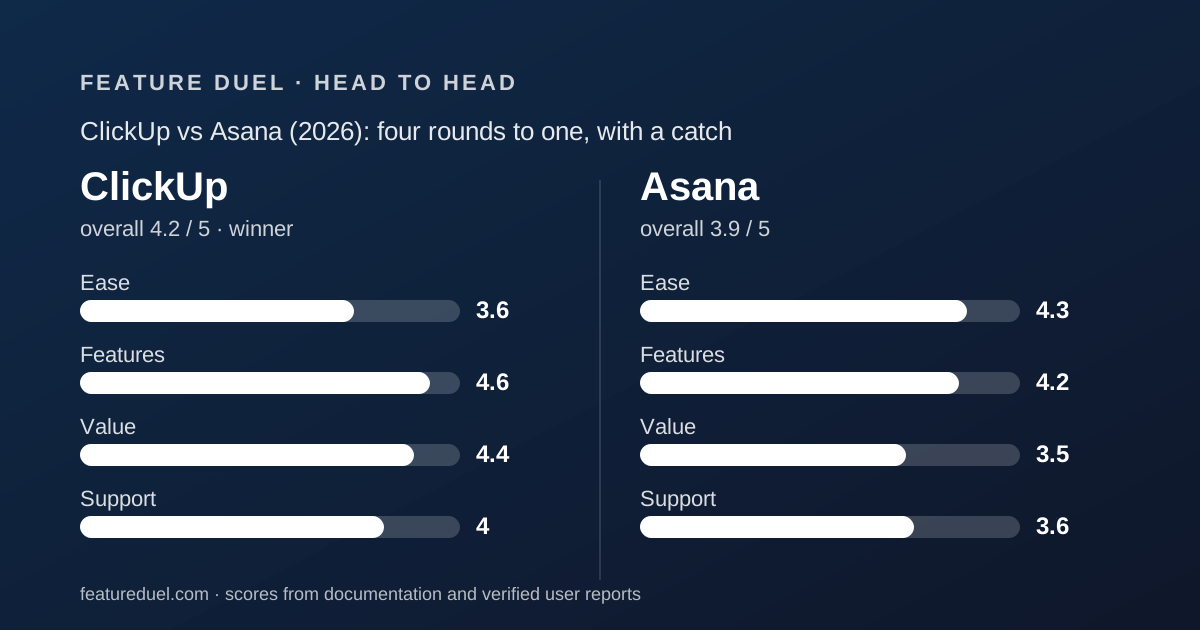
ClickUp and Asana sit at opposite ends of the same shelf. ClickUp bundles tasks, docs, whiteboards, chat and sprints for the lowest seat price in the project management cluster. Asana does one thing, task management with a single owner and a date, and does it with fewer settings. Over the five fixed rounds used on every duel here, ClickUp wins four: core workflow, integrations, pricing and support. Asana wins onboarding, and for a team with nobody willing to configure a workspace, that one round is the whole fight. All figures come from the two pricing pages, plan tables and integration directories, checked October 10, 2026. This is a documentation review, not a staged demo.
 4.2ClickUp
 3.9Asana
Specification by specification
| Spec | ClickUp | Asana |
|---|---|---|
| Cheapest paid tier (annual) | Core $8/user/mo (regular $12 shown) | Starter $10.99/user/mo |
| Mid tier (annual) | Business $17 (regular $25 shown) | Advanced $24.99 |
| Monthly billing | Not shown for current tiers | Starter $13.49, Advanced $30.49 |
| Free plan | Unlimited members, 60MB storage | 2 users, unlimited storage, 100MB per file |
| Seat minimum | None stated | None; blocks of 5 from 6 to 30 users |
| Automation quota | 1,000/mo Core, 10,000/mo Business | Unlimited from Starter |
| Integration count | 1,000+ claimed | Hundreds listed; no total printed |
| Custom fields and Gantt | Core $8 | Starter $10.99 |
| Dashboards | Trial on Free and Core; included from Business | Included from Starter |
| Portfolios, goals, workload | Goals on Core; workload on Business | Advanced $24.99 |
| Published support by tier | 24/7 all tiers; live chat from Core; priority on Enterprise | Not published |
| Team of 10, cheapest paid tier | $80/mo listed, $120 at regular price | $109.90/mo |
| Ease / Features / Value / Support | 3.6 / 4.6 / 4.4 / 4.0 | 4.3 / 4.2 / 3.5 / 3.6 |
The short answer
ClickUp wins this duel 4 rounds to 1 on the fixed scorecard. The one round it loses, onboarding, is the one that decides whether a team ever reaches the other four. Read the two bullets before you trust the tally.
- ClickUp is best for small and mid-size teams that want tasks, docs, whiteboards, chat and sprints on one bill, have someone who will own the workspace setup, and treat price as a deciding factor
- Asana is best for teams whose work is tasks with one owner and a due date, who want unmetered automations and a clean roll-up to portfolios and goals, and who would rather have fewer settings than more features
- Winner on rounds: ClickUp takes core workflow, integrations, pricing and support; Asana takes onboarding
- Disclaimer: this is a documentation review. Scores come from pricing pages, plan tables and integration directories checked October 10, 2026, not from staged demos
Round 1, onboarding: Asana is usable sooner because there is less to decide
Asana takes the onboarding round by the widest margin of any round in this duel. Its model is task, owner, date, project. A new user can be productive without learning a schema.
ClickUp's model is Workspace, Space, Folder, List, task, subtask, plus ClickApps that switch features on or off per Space. The pricing page's own plan table distinguishes Trial, limited and included states across dozens of rows per tier.
That is the amount of decision-making a team faces before it has agreed where anything lives.
ClickUp has two real counters. Its integrations page lists automatic importers from Asana, Trello, Todoist, Jira, monday.com, Basecamp, Wrike and Confluence, so moving in is mechanical. And Free allows unlimited members, so the whole team can learn before anyone pays.
Asana's weakness is the paywall placement: custom fields and rules sit on Starter. Neither help center scored here, because help.clickup.com blocked our read and Asana's does not publish per-plan terms. Ease scores: Asana 4.3, ClickUp 3.6. Details in the Asana review and the ClickUp review.
Round 2, core workflow: ClickUp includes more on its cheapest tier
ClickUp takes the core workflow round on what Core includes at $8 per user per month billed annually, per the plan table checked October 10, 2026: unlimited custom fields, custom task types, unlimited Gantt, unlimited storage, goals, docs, forms, chat and guest permissions.
Asana Starter at $10.99 includes custom fields, timeline and Gantt, forms, rules and dashboards. It does not include docs, whiteboards or chat, because Asana does not sell them. Goals and portfolios wait for Advanced at $24.99.
Asana has one line it wins outright, and it is important. Automations are unlimited from Starter. ClickUp meters them: 1,000 actions per month on Core, 10,000 on Business, 1M on Enterprise. A heavily automated 10-person team can feel 1,000 a month; 10,000 is comfortable.
Asana also wins dashboards on the cheap tier. ClickUp marks dashboards as Trial on Free and Core and includes them from Business. Asana includes reporting dashboards from Starter.
So the round is breadth against discipline. For the fixed round definition, core workflow, ClickUp's Core tier simply does more jobs. Teams who only want task management should weight Asana's two wins heavily. Features scores: ClickUp 4.6, Asana 4.2.
Round 3, integrations: ClickUp claims more; Asana gates the enterprise connectors
ClickUp takes the integrations round narrowly. Its integrations page claims 1,000+ integrations, with native connectors for Slack, GitHub, GitLab, Google Drive, Microsoft Teams, Salesforce, HubSpot, Jira, Zoom, Figma and OpenAI, plus Zapier and Make for the long tail, per the page checked October 10, 2026.
The automatic importers from Asana and seven other tools belong in this round too. They are the mechanism by which a team actually leaves Asana for ClickUp.
Asana's apps directory is deep rather than numbered. It spans communication, files, connectors, AI, development, sales, finance, security, reporting and time tracking, with Slack, Teams, Drive, Zapier, Make, GitHub, Jira and Salesforce present. It prints no total count.
Two gates decide the margin. Asana puts its Salesforce, Tableau and Power BI connectors on Advanced at $24.99. ClickUp puts webhooks on Business at $17. Both charge extra for the integrations enterprises care about, but ClickUp's gate is cheaper. Round to ClickUp.
Round 4, pricing: ClickUp is cheaper at every tier, with a renewal catch
ClickUp takes the pricing round and it is not close on stickers. Core is listed at $8 per user per month billed annually against Asana Starter at $10.99. Business is $17 against Asana Advanced at $24.99, per both pricing pages checked October 10, 2026.
For a team of 10, editorial calculation: ClickUp Core $80 per month, Asana Starter $109.90. ClickUp Business $170, Asana Advanced $249.90.
The catch is printed beside ClickUp's prices. Core shows a struck-through regular price of $12 and Business shows $25. At those regular prices the 10-person team pays $120 and $250, which is roughly level with Asana.
Budget at the regular price and treat the listed price as a discount.
Free plans are not close. ClickUp's Free Forever allows unlimited members and guests with 60MB of storage and cumulative use limits that never reset. Asana's Personal plan is 2 users with unlimited storage at 100MB per file.
For a team of 4 that is the difference between free and $43.96 a month, by editorial calculation.
Asana's seat blocks widen the gap. From 6 to 30 users Asana sells seats in fives, so a 7-person team pays for 10. ClickUp states no seat minimum and prorates mid-cycle additions.
Value scores: ClickUp 4.4, Asana 3.5. Annual billing vs monthly billing covers the commitment side for both.
Round 5, support: ClickUp prints its support terms; Asana does not
ClickUp takes the support round on transparency alone. Its plan table lists 24/7 support on every tier including Free, live chat support from Core, priority support on Enterprise and Max, and premium support on Max, per the pricing page checked October 10, 2026.
Asana's pricing page lists a Help Center, direct Asana Support and Customer Success options with eligibility requirements, with no tier attached to any of them.
Asana's Help Center, Academy and community forum are public and well organised, which is why its support score is not lower.
Neither help center could be fully assessed. help.clickup.com returned a 403 to automated reads on October 10, 2026, so ClickUp University and any stated response times are unverified. The older ClickUp plan table mentions a Customer Success Manager on Enterprise; the newer one does not.
A buyer with a procurement form can copy ClickUp's support row straight across. With Asana, they have to ask sales. Support scores: ClickUp 4.0, Asana 3.6. monday.com sits between them; see Asana vs monday.com.
The seat maths at 2, 4, 7 and 25 people
Sticker prices understate the gap at small sizes and overstate it at renewal, so here is the editorial arithmetic for four team sizes, using the annual per-seat prices on both pricing pages checked October 10, 2026.
ClickUp is shown at the listed price with the regular price in brackets. Asana applies its seat blocks.
At 2 people both are free. Asana's Personal plan covers exactly 2 users; ClickUp's Free Forever covers any number with 60MB of storage.
At 4 people Asana must go paid: Starter $43.96. ClickUp can stay on Free, or move to Core for $32 ($48 regular) when the storage cap or the 100 monthly automation actions bite.
At 7 people Asana charges for 10 Starter seats: $109.90. ClickUp Core is $56 ($84 regular). Even at the regular price ClickUp is $25.90 cheaper, and it includes docs and unlimited storage.
At 25 people Asana's block is exactly 25: $274.75 on Starter or $624.75 on Advanced. ClickUp Core is $200 ($300 regular) and Business is $425 ($625 regular). At regular prices the mid tiers are level; at listed prices ClickUp is $200 a month cheaper.
- 2 people: both free
- 4 people: Asana $43.96 vs ClickUp free or $32 ($48 regular)
- 7 people: Asana $109.90 (10 seats) vs ClickUp $56 ($84 regular)
- 25 people: Asana $274.75 Starter or $624.75 Advanced vs ClickUp $200 ($300) Core or $425 ($625) Business
Where AI sits in each plan
Both vendors meter AI and neither defines the unit clearly, so this section reports the allowances without pretending they are comparable.
Asana's pricing page lists 5 AI requests per user per month on paid tiers, capped at 50 per account on Starter and Advanced and 250 on Enterprise.
Asana adds AI Studio credits of 50K, 75K and 200K per billing account per month. AI Teammates and the Dash assistant are excluded from the free plan.
ClickUp's pricing page lists Brain credits pooled per user per month: 1,000 on Core, 1,500 on Business, 3,000 on Enterprise and 10,000 on Max, with 500 per Workspace on Free.
An add-on sells 10,000 AI Super Credits for $10. Max adds unlimited AI fields, a notetaker, image generation and autopilot agents.
The structural difference is that ClickUp's allowance scales with the tier and can be topped up, while Asana's is a flat per-user ration with an account ceiling.
If AI is the reason you are buying, ask both vendors for a credit consumption table before you sign.
How the five rounds weigh for three kinds of team
The fixed scorecard says ClickUp by 4 to 1. Which rounds carry weight depends on the team, so here is how the duel reads for three common cases.
A 5-person startup with no admin. Onboarding dominates and nobody owns setup. Asana on Starter at $54.95, because the team will be managing tasks on day one instead of configuring Spaces.
ClickUp's Free Forever is tempting for the same startup, and it works if one founder enjoys building the workspace.
A 12-person product team running sprints and docs. Core workflow and pricing dominate. ClickUp Business at $204 ($300 regular) includes sprints, docs, whiteboards, dashboards and 10,000 automations.
Asana charges that team for 15 seats and does not sell docs or whiteboards. Starter is $164.85 with dashboards included; Advanced is $374.85 for portfolios.
A 30-person operations group with heavy automation. Asana's unmetered automations and clean roll-up matter more than ClickUp's breadth. Asana Starter is $329.70, Advanced $749.70.
ClickUp Business at $510 ($750 regular) carries 10,000 actions a month, which a 30-person group can exceed. This is the case where Asana's one round beats ClickUp's four.
In two of the three cases ClickUp wins; in the third, the onboarding round and the automation ceiling together hand it to Asana. Read the tally with the short answer, not instead of it.
What users report
G2, Capterra and TrustRadius blocked automated reads of both products' pages on October 10, 2026. This duel quotes no aggregate ratings and no review counts for either tool, and will add them with the date checked when the pages open up.
Two substitutes are available now. ClickUp's free plan with unlimited members lets a whole team form its own opinion. Asana's public community forum shows how quickly product questions get answered.
Choose ClickUp if
ClickUp is the right pick when the following hold.
- You want docs, whiteboards, chat and tasks on one bill and will switch off what you do not use
- Someone on the team will own the workspace setup and keep the hierarchy tidy
- Price decides it; Core at $8 listed, or $12 regular, undercuts Asana Starter at $10.99
- You have more than 2 people and no budget yet; Free allows unlimited members
- You need support terms in writing before procurement will sign
Choose Asana if
Asana is the right pick when these fit better.
- Nobody wants to configure anything; Asana is productive on day one with task, owner, date, project
- You automate heavily and do not want a 1,000 or 10,000 action ceiling
- You need dashboards on the cheapest tier; Asana includes them from Starter, ClickUp from Business
- You will need portfolios, goals and workload and are willing to pay $24.99 for a clean roll-up
- Your headcount is a multiple of 5, so the seat blocks cost nothing extra
Bottom line
ClickUp wins 4 rounds to 1: core workflow, integrations, pricing and support. Asana wins onboarding, and that single round is decisive for teams with no appetite for setup.
If your team wants the most tool per dollar and someone enjoys building systems, buy ClickUp, budget at the regular price rather than the listed one, and start the whole team on Free.
If your team wants to manage tasks and nothing else, with automations that never hit a ceiling, buy Asana and round your headcount up to the next block of 5.
The third tool in this cluster, monday.com, beats both on onboarding and loses to both on automation quotas. Whether to buy one platform at all is argued in all-in-one suite vs best-of-breed stack.
If ClickUp's unlimited free members tempt anyone to share a paid login later, read shared login vs a seat per person. The scoring rules are in how a duel is scored and the editorial policy.
Frequently asked
Which is cheaper for a 10-person team, ClickUp or Asana?
ClickUp. Core is $80 per month billed annually at the listed $8, or $120 at the regular $12 printed beside it, against Asana Starter at $109.90. Editorial calculation from both pricing pages checked October 10, 2026.
Is ClickUp harder to learn than Asana?
By the vendors' own documentation, yes. ClickUp has a four-level hierarchy plus per-Space ClickApps; Asana's model is task, owner, date, project. That is why Asana scores 4.3 on ease and ClickUp 3.6.
Can I import Asana projects into ClickUp?
Yes. ClickUp's integrations page lists an automatic importer for Asana alongside Trello, Todoist, Jira, monday.com, Basecamp, Wrike and Confluence, as of October 10, 2026. Automation rules do not transfer, so rebuild them and test with a copy of one project first.
Which has the better free plan, ClickUp or Asana?
ClickUp for headcount, Asana for storage. ClickUp Free allows unlimited members with 60MB of storage and cumulative limits that never reset. Asana Personal is 2 users with unlimited storage at 100MB per file. A team of 3 or more can only stay free on ClickUp.
Does ClickUp limit automations?
Yes: 100 actions per month on Free, 1,000 on Core, 10,000 on Business, 1M on Enterprise and Max, per the pricing page checked October 10, 2026. Asana lists unlimited automations from Starter with no quota.
Visit ClickUp
We have no affiliate relationship with this vendor. Link goes to the official site.
Visit Asana
We have no affiliate relationship with this vendor. Link goes to the official site.