 Feature

monday.com
The board-first work OS that gets a team to a usable dashboard fastest, then meters the automations that keep it running
Scored on the published rubric, from documentation, pricing and verified user reports.
Best for: Teams of 3 to 40 that think in boards, status columns and dashboards, and want something visual running in a day.
Verdict
monday.com wins the onboarding round of this cluster outright. A board with coloured status columns is the whole mental model, and the pricing page lists 200+ templates on even the free plan. This is a documentation review: scores come from monday.com's pricing page, integrations marketplace and public FAQ, checked October 10, 2026, and we note where the help center could not be read. The catch is metering. Standard, at $12 per seat per month billed annually, caps automation actions and integration actions at 250 each per month. Pro, at $19, lifts both to 25,000. A busy 10-person board will blow through 250 in a week, so Pro is the real floor for teams that automate. Paid plans start at 3 users, and the free plan is 2 seats with 3 boards. Support terms are published only for Enterprise, which states 24/7 expert support. The 14-day Pro trial is the best try-before-you-buy offer in the cluster. Buy it for visual operations work. Budget for Pro, not Standard.
Visit monday.com
We have no affiliate relationship with this vendor. Link goes to the official site.
Where it is strong
- Fastest path to a working board and dashboard: 200+ templates listed on every plan including Free
- 14-day free trial of the Pro plan stated in the pricing FAQ, the only published trial in this cluster
- 850+ integrations and apps claimed on the marketplace page, with Zapier, Make and official AI assistant connectors
- Unlimited free viewers from Basic upward keep read-only stakeholders out of the seat count
- Clear plan ladder: each tier prints its workflow, automation and API quotas
Where it falls short
- Standard caps automation and integration actions at 250 each per month, which is low for a real team
- Paid plans start at 3 users, so solo buyers and pairs pay for a third seat
- Free plan is limited to 2 seats, 3 boards and 3 Docs
- Monthly billing is not discounted and the monthly per-seat figures were not readable on the page we checked
- Support channels are published only for Enterprise; the help center blocked our read
At a glance
| Starting price | $9/seat/mo billed annually (Basic), 3-seat minimum |
|---|---|
| Pricing note | From $9/seat/mo billed annually, 3-seat minimum (pricing page, checked October 10, 2026) |
| Free plan | 2 seats, 3 boards, 3 Docs, 200+ templates |
| Seat minimum | 3 users on paid plans, per the pricing FAQ |
| Trial | 14-day free trial of the Pro plan |
| Support channels | 24/7 expert support stated on Enterprise only; other tiers not published |
| Automations | 250 actions/mo on Standard, 25,000 on Pro, up to 250,000 combined on Enterprise |
| API calls | 1,000/day Standard, 10,000/day Pro, 25,000/day Enterprise |
What monday.com actually is
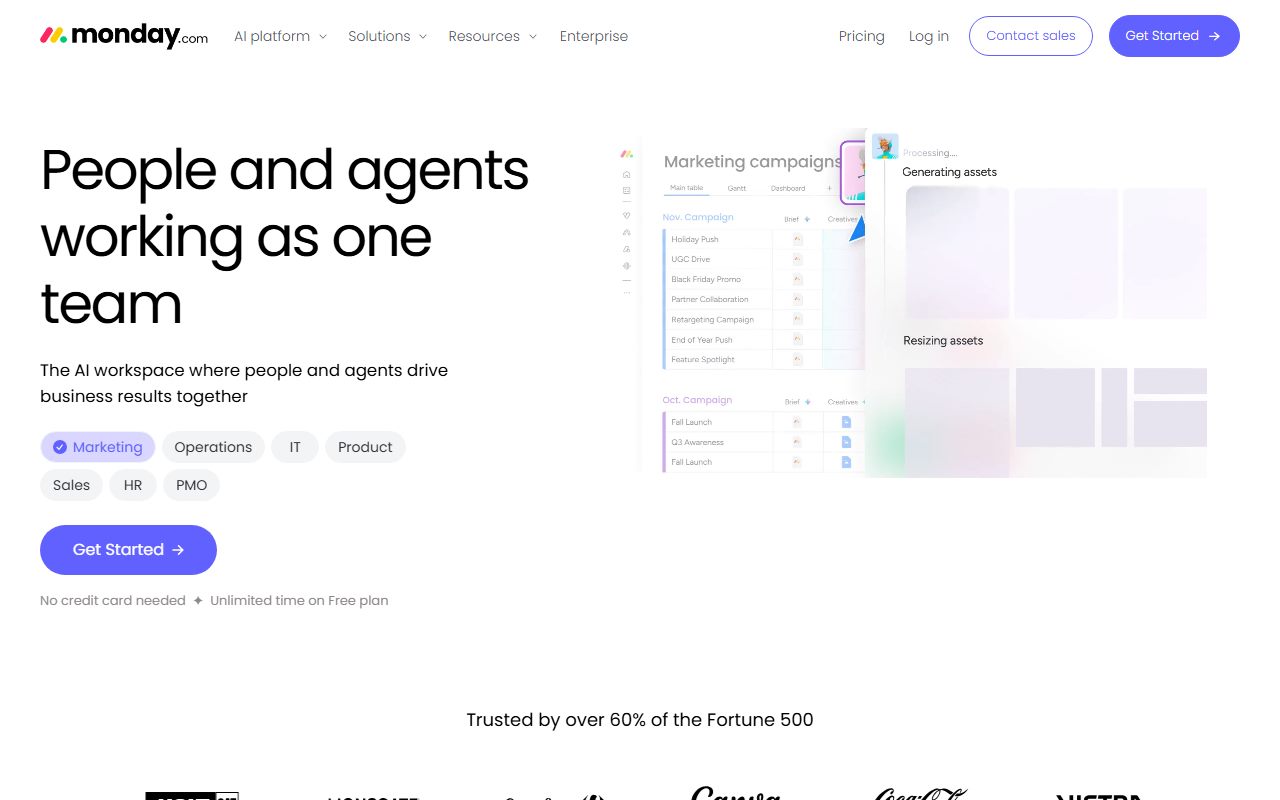
monday.com is a spreadsheet that grew a personality. The core object is a board: rows are items, columns are typed fields such as status, person, date, number or timeline. Groups split a board into sections, and dashboards aggregate across boards.
There is no enforced single owner on an item and no enforced hierarchy. That looseness is why a new team has a board running in an afternoon and why large accounts need governance features from Enterprise to stay tidy.
The vendor calls the product line a Work OS and sells separate editions for CRM, service and dev at their own prices. This review covers monday work management only.
The five fixed rounds, onboarding, core workflow, integrations, pricing and support, are described in how a duel is scored and the rubric lives on the editorial policy page.
Who monday.com is best for
monday.com fits teams who want to see work rather than read it.
- Operations teams tracking vendors, orders or requests as rows with a status column
- Marketing teams running content calendars that non-specialists need to update
- HR and recruiting teams using boards as lightweight pipelines
- Creative and production studios that want a client-facing dashboard without a BI tool
- Managers who want a 200+ template library instead of building from a blank page
- Teams that need read-only stakeholders, since Basic and above include unlimited free viewers
Who should skip it
Three groups should pause before buying.
- Solo founders and pairs; paid plans start at 3 seats, per the pricing FAQ
- Teams running dependency-heavy project plans with strict ownership; Asana enforces that structure
- Teams that want docs, whiteboards and chat bundled at a low price; ClickUp includes more on its lower tiers
What the free tier includes (as of October 2026)
The Free plan is up to 2 seats, up to 3 boards and up to 3 Docs, with 200+ templates, 8 column types and the iOS and Android apps, per the pricing page checked October 10, 2026.
The page does not state an item limit for Free. Unlimited items first appear on Basic. There are no automations or integrations on Free, and no Timeline, Gantt or calendar views.
In practice Free is a demo of the board model for two people. The 14-day Pro trial is the better way to evaluate the product with a real team.
How the pricing is structured
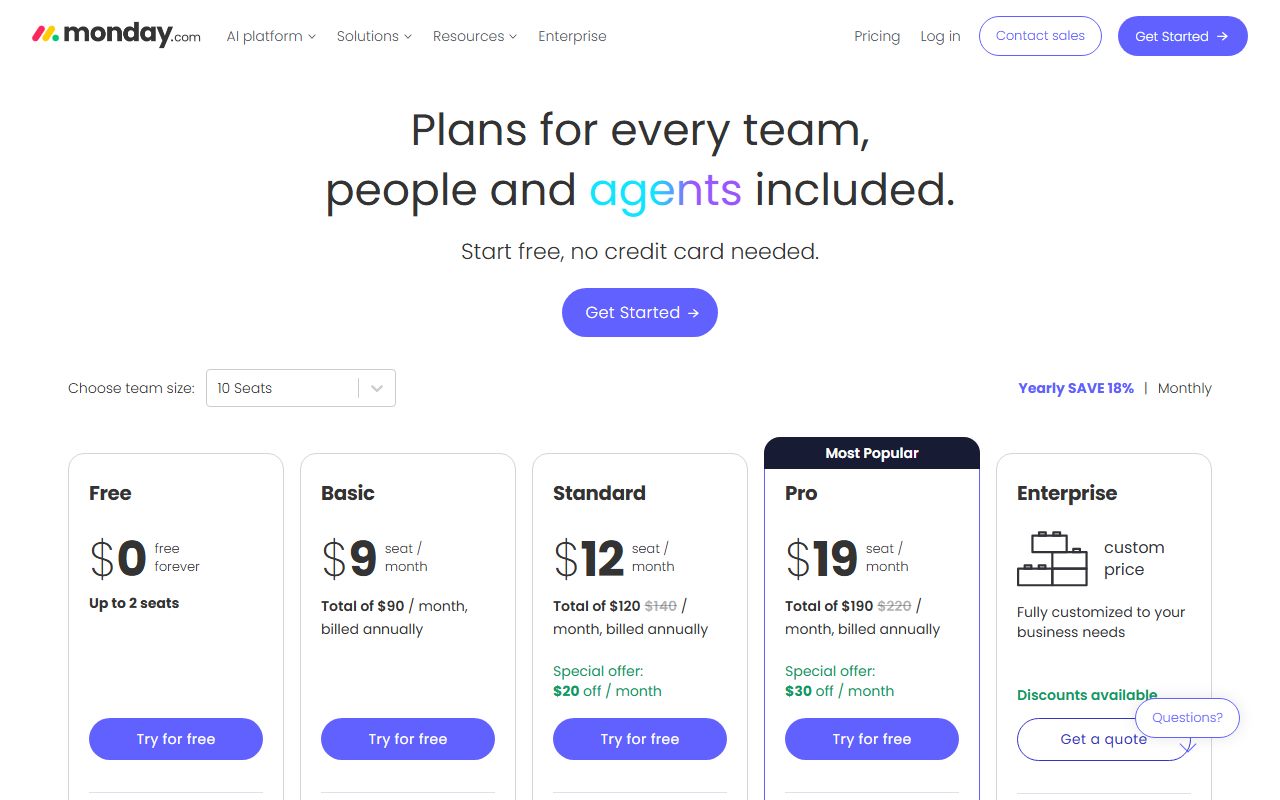
Four paid tiers, priced per seat per month billed annually: Basic $9, Standard $12, Pro $19, Enterprise by quote. Paid plans start from 3 users, per the pricing FAQ checked October 10, 2026.
Monthly billing exists behind a toggle, but the figures did not render on the page we read, so we do not print them. The FAQ states that the monthly plan is not discounted. The commitment question is covered in annual billing vs monthly billing.
For a team of 10, editorial calculation from the annual prices: Basic $90 per month, Standard $120, Pro $190. For a team of 2 the real floor is 3 seats, so Basic costs $27, not $18.
Enterprise quotes are offered for more than 40 users. The pricing page lists no seat increment bands beyond the 3-user minimum, which is simpler than Asana's blocks of 5 and 10.
If the seat minimum tempts you toward one shared account, shared login vs a seat per person explains why that backfires on a board-based tool.
What sits behind the paywall
Basic adds unlimited items and unlimited free viewers, plus limited AI agents, the Sidekick assistant and the Vibe app builder, per the pricing page.
Standard is where the product becomes usable for a team: automations and integrations at 250 actions each per month, 3 workflows, Timeline and Gantt views, calendar view, guest access, the AI Notetaker and AI columns.
Pro lifts automation and integration actions to 25,000 each per month, 20 workflows, and adds private boards and Docs, advanced views, time tracking, advanced columns and the AI workflow builder.
Enterprise adds 250 workflows, up to 250,000 combined actions, enterprise security and governance, portfolio and resource management, multi-level permissions, 24/7 enterprise support and a 99.9 percent uptime SLA.
AI credits per month are printed per tier: 1,000 on Basic, 2,000 on Standard, 3,000 on Pro, custom on Enterprise. API calls per day: 1,000 on Standard, 10,000 on Pro, 25,000 on Enterprise.
Ease of use: what the onboarding score is built from
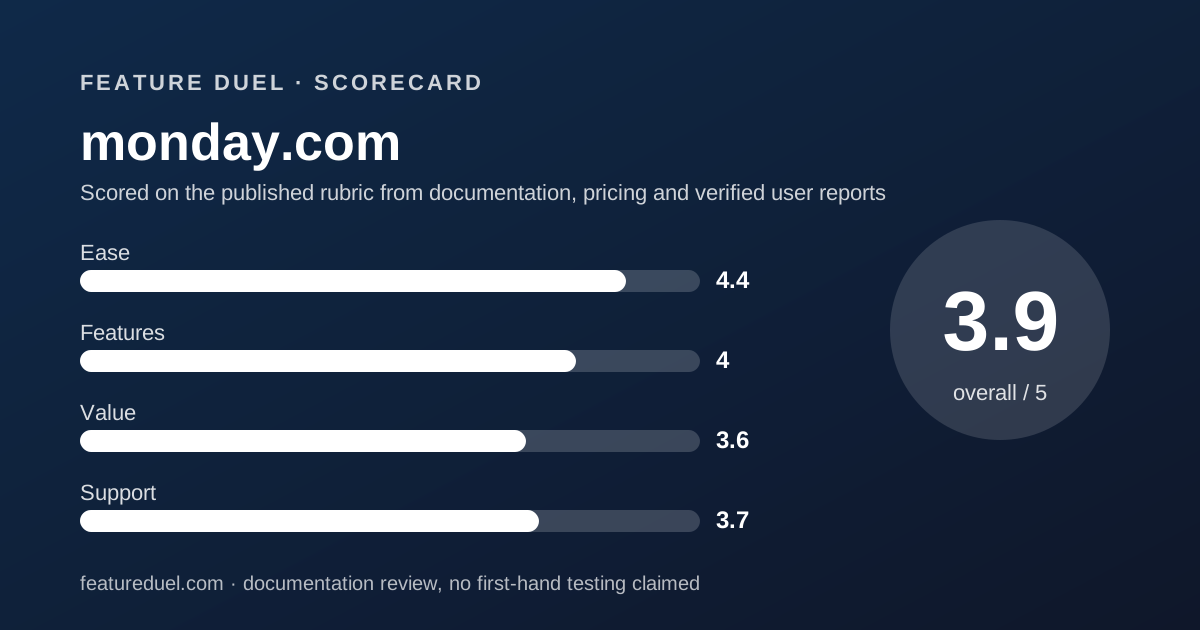
The 4.4 for ease is the highest score monday.com earns and the highest onboarding score in this cluster. The reasons are all on the vendor's own pages.
The board model needs no training to understand: rows, typed columns, colour. 200+ templates are available on every tier including Free. The 14-day Pro trial means a team evaluates the real product, not a cut-down version.
The deduction is for the plan ladder. Views that most teams assume are standard, Timeline, Gantt and calendar, do not appear until Standard. A team that starts on Basic will hit that wall in the first week.
Features: what the core workflow score is built from
The 4.0 for features is a strong board engine held back by quotas. Typed columns, groups, dashboards and the template library handle the core workflow of an operations or marketing team well.
The integrations round is monday.com's best feature claim. The marketplace page states 850+ integrations and apps, including Slack, Microsoft Teams, Gmail, Outlook, Zoom, Salesforce, HubSpot, Zendesk, GitHub, GitLab and Jira.
QuickBooks, Mailchimp, Zapier and Make are listed too, plus official connectors for Claude, Copilot and ChatGPT through the monday MCP, per the marketplace page checked October 10, 2026.
The deduction is metering. Standard allows 250 automation actions and 250 integration actions per month. A status-change rule firing on a 10-person board can exhaust that in days. Asana states unlimited automations from its Starter tier; the contrast is laid out in Asana vs monday.com.
Portfolio and resource management, the features that let a manager roll boards up, are Enterprise only. Asana offers the equivalent on its Advanced tier.
The 250-action cap, in plain arithmetic
The number that decides which monday.com tier you need is 250. That is the monthly cap on automation actions on Standard, and separately on integration actions, per the pricing page checked October 10, 2026.
One action is one thing the platform does for you: moving an item when a status changes, notifying a person, creating a subitem, posting to Slack. A single rule that fires on every status change counts one action per change.
Editorial calculation, not a vendor figure: a 10-person team where each person changes 3 statuses a day, on 22 working days, generates 660 status changes a month. One rule on that trigger exhausts Standard's quota before day 9.
Pro's 25,000 actions covers the same team roughly 37 times over. That is why this review treats Pro at $19 as the practical floor for any team that automates, and prices the team of 10 at $190 per month rather than $120.
- Standard: 250 automation actions and 250 integration actions per month
- Pro: 25,000 of each per month
- Enterprise: up to 250,000 combined
- Basic and Free: no automations listed
Value: what the pricing score is built from
The 3.6 for value reflects a fair sticker price with two hidden costs. The sticker: Standard at $12 per seat sits between Asana Starter at $10.99 and ClickUp Business at $17, per the three pricing pages checked October 10, 2026.
Hidden cost one is the 3-seat minimum, which only matters below 3 users but matters a lot to them. Hidden cost two is the action quota, which pushes any automating team from $12 to $19 per seat.
At Pro, a 10-person team pays $190 per month annual. Asana Starter is $109.90 for the same team with unlimited automations, and ClickUp Business is $170 with 10,000 actions. Unlimited free viewers are the genuine saving for teams with many read-only stakeholders.
Support: what the score is built from
The 3.7 for support is a score with a gap in it. The pricing page states 24/7 expert support, tailored onboarding and extensive training on Enterprise. It lists no support terms for Basic, Standard or Pro.
We attempted to read support.monday.com on October 10, 2026, and the site returned a 403 to automated reads. We therefore cannot describe the help center's structure or any stated response times, and we will not guess.
The score is held up by two published facts: the 14-day Pro trial, which is a support-adjacent commitment the rivals do not match, and the Enterprise 24/7 line. ClickUp, which prints support channels against every tier, scores higher in this round.
What verified users report
G2, Capterra and TrustRadius all blocked automated reads of their monday.com pages on October 10, 2026. This review therefore prints no aggregate rating and no review count.
We would rather leave the section short than quote a figure we did not see. When the aggregator pages become readable we will add the ratings with the date checked.
Limits stated by the vendor
Per the pricing page checked October 10, 2026: 2 seats, 3 boards and 3 Docs on Free. 3-user minimum on paid plans. Workflows: 3 on Standard, 20 on Pro, 250 on Enterprise.
Automation and integration actions per month: 250 each on Standard, 25,000 each on Pro, up to 250,000 combined on Enterprise. API calls per day: 1,000, 10,000 and 25,000 respectively.
The vendor does not publish a storage limit per plan on the pricing page, nor a per-file size cap. Enterprise lists a 99.9 percent uptime SLA; lower tiers list none.
Alternatives
The two direct rivals in this cluster split along the board-versus-task line.
Asana. Choose Asana if your work is tasks with one owner, dependencies and a roll-up to goals, and you want automations without a meter. Otherwise choose monday.com if your team needs a visual board and dashboard running this week.
The five rounds between them are scored in Asana vs monday.com.
ClickUp. Choose ClickUp if you want docs, whiteboards, chat and sprints bundled with tasks at a lower per-seat price and will accept more configuration. Otherwise choose monday.com for a simpler surface and a stronger template library. ClickUp's own duel is ClickUp vs Asana.
If the real question is whether to buy one platform at all, read all-in-one suite vs best-of-breed stack first.
Bottom line
monday.com takes the onboarding round of this cluster and makes the strongest integrations claim. It loses the core workflow round on action quotas and the pricing round on the Pro upsell those quotas force.
Buy it for visual operations work with 3 to 40 people, start on the 14-day Pro trial, and budget for Pro rather than Standard if you automate anything.
This is a documentation review based on monday.com's pricing page, FAQ and marketplace, checked October 10, 2026. The help center was unreadable to us on that date and the review says so rather than pretending otherwise.
Buy it if
- Your team pictures work as boards with status columns, not task lists
- You want a dashboard a manager can read in week one without a consultant
- You can budget for Pro at $19 per seat, because Standard's 250-action cap will not last
- You have at least 3 people, so the seat minimum costs you nothing
Skip it if
- You are one or two people paying for a third seat you do not use
- You automate heavily on a tight budget; the 250-action cap on Standard is the lowest in this cluster
- You need support terms in writing below Enterprise
Frequently asked
Is monday.com free?
There is a Free plan for up to 2 seats with 3 boards, 3 Docs, 200+ templates and 8 column types, per the pricing page checked October 10, 2026. Unlimited items, automations and integrations all require a paid plan.
How much does monday.com cost for 10 people?
Editorial calculation from the annual per-seat prices on October 10, 2026: Basic $90 per month, Standard $120, Pro $190. The FAQ says monthly billing is not discounted, so expect a higher figure month to month.
Does monday.com have a free trial?
Yes. The pricing FAQ states a 14-day free trial of the Pro plan for monday work management, CRM and dev. It is the only published free trial among Asana, monday.com and ClickUp as of October 2026.
What is the minimum number of seats on monday.com?
The pricing FAQ says paid plans start from 3 users. A solo user or a pair on Basic still pays for 3 seats, which is $27 per month billed annually by editorial calculation.
How many automations does monday.com allow?
Per the pricing page: 250 automation actions and 250 integration actions per month on Standard, 25,000 each on Pro, and up to 250,000 combined on Enterprise. Basic lists no automations. Asana, by contrast, states unlimited automations from its Starter plan.
Who is monday.com best for?
Teams of 3 to 40 in operations, marketing, HR or creative production who want a visual board and a dashboard quickly. Teams whose work is dependency-heavy task lists usually fit Asana better.
Sources
- monday.com pricing page and FAQ - checked October 10, 2026
- monday.com integrations marketplace - checked October 10, 2026
- monday.com support center (blocked automated read on check date) - checked October 10, 2026
Update history
- October 10, 2026 - First published. Pricing page, FAQ and integrations marketplace checked; support center returned 403.
Visit monday.com
We have no affiliate relationship with this vendor. Link goes to the official site.