 Feature

Asana
The task-first project manager that scales cleanly from two people to an enterprise portfolio, if you pay for it
Scored on the published rubric, from documentation, pricing and verified user reports.
Best for: Teams of 5 to 500 that run work as tasks with owners and due dates, and want structure that survives growth.
Verdict
Asana is the most disciplined of the three big project managers in this duel cluster. Every piece of work is a task with one owner and one date, projects roll into portfolios, and portfolios roll into goals on the Advanced plan. That structure is why it scales without turning into a swamp. This is a documentation review: scores come from Asana's pricing page, help center, apps directory and community forum, all checked October 10, 2026, not from staged demos. The price is the weak round. Starter is $10.99 per user per month billed annually, and the jump to Advanced at $24.99 is where portfolios, goals and workload live. Seats are sold in increments of 5 once you pass 5 users, so a team of 7 pays for 10. The free Personal plan caps at 2 users, which is the smallest free tier of the three. Support is the second weak round, because Asana does not publish which plans get which support channel. If your work is tasks, buy it. If your work is boards and dashboards, read the monday.com duel first.
Visit Asana
We have no affiliate relationship with this vendor. Link goes to the official site.
Where it is strong
- Unlimited tasks, projects and storage on every tier, including the free plan, per the pricing page
- Unlimited automations from Starter upward, with no monthly action quota stated
- Portfolios, goals and workload on Advanced give managers a real roll-up layer
- Hundreds of integrations listed, with Salesforce, Tableau and Power BI connectors on Advanced
- Unlimited free guests on Starter and above
Where it falls short
- Free plan is capped at 2 users, the smallest of the three tools in this cluster
- Seats are sold in blocks of 5 between 6 and 30 users, so odd team sizes overpay
- Support channels per plan are not published anywhere we could read
- The Starter to Advanced jump more than doubles the per-seat price
- No free trial is mentioned on the pricing page
At a glance
| Starting price | $10.99/user/mo billed annually (Starter) |
|---|---|
| Pricing note | From $10.99/user/mo billed annually (pricing page, checked October 10, 2026) |
| Free plan | Personal: 2 users, unlimited tasks and projects, 100MB per file |
| Seat minimum | None stated; seats sold in increments of 1 up to 5 users, then 5, 10, 25, 50 |
| Trial | Not mentioned on the pricing page |
| Support channels | Help Center, Academy, community forum, direct support; per-plan split not published |
| Automations | Unlimited on Starter and above |
| AI | 5 AI requests per user per month on paid tiers, capped per account |
What Asana actually is
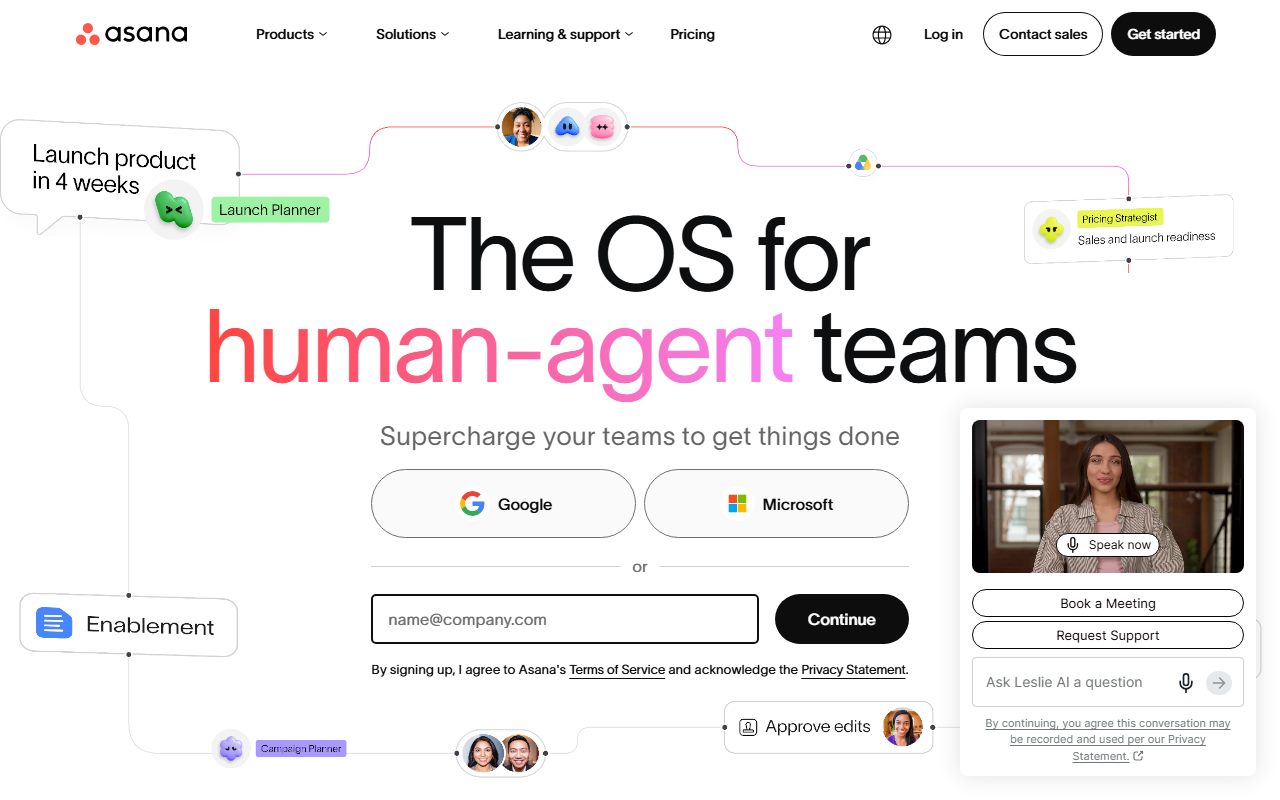
Asana is a task graph with project views bolted on top. Every unit of work is a task with one assignee and one due date. Tasks live in projects, projects can roll into portfolios, and portfolios can report against goals on the Advanced plan.
That single-owner rule is the whole personality of the product. It is why Asana stays legible at 300 people and why some small teams find it stiff. You cannot half-assign something.
Views are list, board, calendar and, from Starter upward, timeline and Gantt, per the pricing page checked October 10, 2026. Reporting dashboards, forms, custom fields and rules also start at Starter.
This review scores Asana on the five fixed rounds used across the site: onboarding, core workflow, integrations, pricing and support. The rubric is on the editorial policy page and the scoring logic is explained in how a duel is scored.
Who Asana is best for
Asana fits teams whose work is a list of things that someone owns by a date. It fits less well when work is a wall of status cards.
- Marketing teams running campaign calendars with dependencies between creative, copy and launch
- Operations teams that need recurring tasks, approvals and forms feeding a single intake project
- Product teams that want roadmap portfolios reporting up to quarterly goals
- Agencies with many clients, using unlimited free guests to keep clients out of the seat count
- Leaders who want workload and capacity views without a separate resourcing tool
- Organisations above 100 people that will eventually need SAML SSO and SCIM on Enterprise
Who should skip it
Three groups should look elsewhere before paying.
- Teams of 3 or 4 that want a free tier; Asana's free plan stops at 2 users
- Teams that run on visual boards, colour-coded status columns and dashboards first; monday.com is built for that
- Teams that want docs, whiteboards, chat and tasks in one tool at a low price; ClickUp bundles more for less
What the free tier includes (as of October 2026)
The Personal plan is free for 2 users. It includes unlimited tasks, projects and storage, with a 100MB cap per file, plus list, board and calendar views, status updates and 100+ integrations, per the pricing page.
Two users is the tightest free cap in this cluster. monday.com also stops at 2 seats but adds a 3-board limit. ClickUp allows unlimited free members with a 60MB storage ceiling. The free tier is a solo or duo workspace, not a team trial.
AI Teammates and the Dash reporting assistant are excluded from Personal. Timeline, Gantt, dashboards, forms, custom fields and automations all sit behind the paywall.
How the pricing is structured
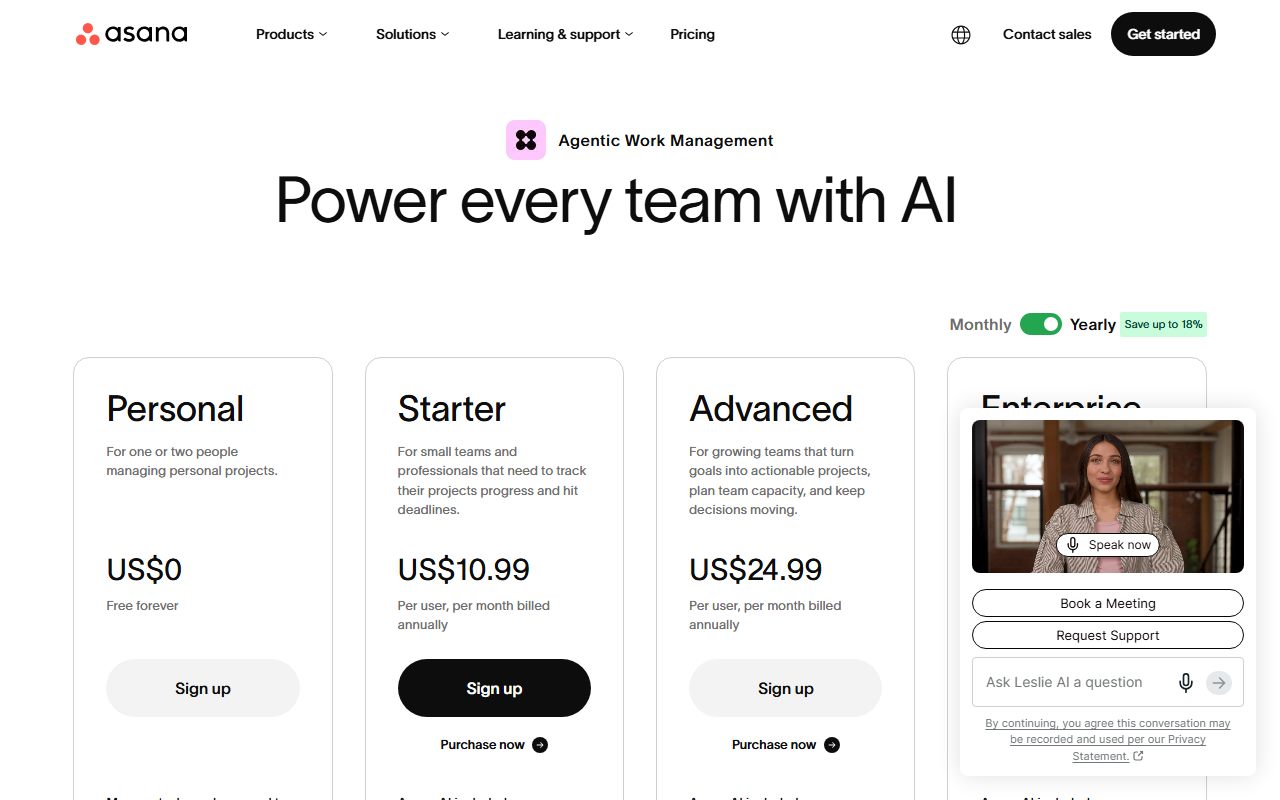
Asana sells four tiers. Starter is $10.99 per user per month billed annually or $13.49 monthly. Advanced is $24.99 annual or $30.49 monthly. Enterprise and Enterprise+ are quoted by sales, per the pricing page checked October 10, 2026.
Annual billing is listed roughly 18 percent below monthly on both paid tiers. That is an editorial calculation from the two listed prices. The trade-offs of committing for a year are covered in annual billing vs monthly billing.
The detail that catches buyers is seat increments. Between 2 and 5 users you add seats one at a time. Up to 30 users you add in blocks of 5.
Up to 100 users you add in blocks of 10, up to 500 in blocks of 25, and beyond that in blocks of 50, per the pricing FAQ.
So a team of 7 buys 10 Starter seats: $109.90 per month annual, not $76.93. A team of 12 buys 15. Round your headcount up to the next block before you compare Asana to anyone else.
For a flat team of 10 the editorial arithmetic is $109.90 per month on Starter and $249.90 on Advanced, both billed annually. The pricing page does not mention a free trial.
If sharing one login to dodge seat costs crosses your mind, read shared login vs a seat per person first.
What sits behind the paywall
Starter unlocks the features most teams assume are basic: timeline and Gantt views, reporting dashboards, unlimited automations, forms, custom templates, custom fields and unlimited free guests. It also removes the user cap entirely.
Advanced is the management layer: unlimited portfolios, goals, resource management, approvals and proofing, forms with branching, native time tracking, and connectors for Salesforce, Tableau and Power BI.
Enterprise adds SAML SSO, SCIM provisioning, capacity planning, service accounts, view-only licences and admin controls. Enterprise+ adds SIEM integration, data residency, audit logs and dedicated workspaces.
AI is metered on every paid tier: 5 AI requests per user per month, capped at 50 per account on Starter and Advanced and 250 on Enterprise, plus AI Studio credits of 50K, 75K and 200K respectively, per the pricing page.
Ease of use: what the onboarding score is built from
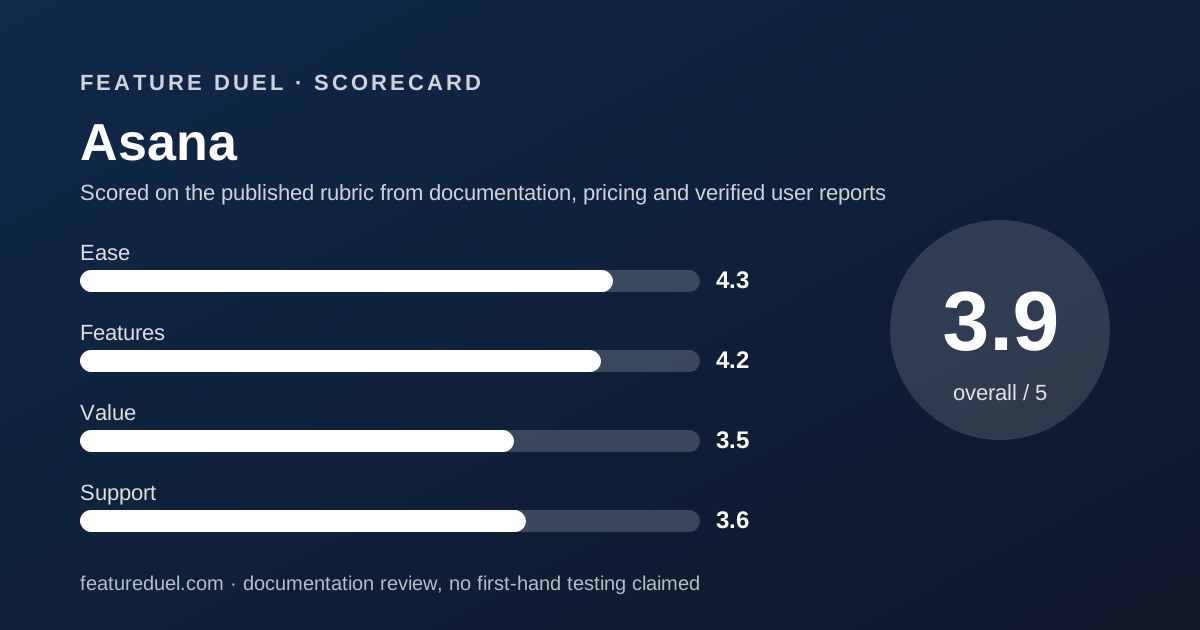
The 4.3 for ease comes from three documented facts. First, the data model is simple to explain: task, owner, date, project. New users rarely have to learn a custom schema before doing anything.
Second, the Help Center is organised around jobs rather than screens: Organize your work, Reporting, App integrations, Account admin, Plans and billing, Troubleshooting.
A 3:41 getting-started video and 25-minute Academy learning paths are linked from the Help Center front page, checked October 10, 2026.
Third, the free plan drops you into a working list view with no setup wizard to fight. The deduction is for the paid feature ladder: custom fields and rules, the two things that make Asana feel like Asana, do not appear until Starter.
Features: what the core workflow score is built from
The 4.2 for features rewards depth where it matters and penalises the price of reaching it. Dependencies, milestones, rules, forms and custom fields on Starter cover the daily core workflow of most teams.
Unlimited automations with no monthly action quota is the standout line in this category. monday.com meters 250 actions per month on Standard and ClickUp meters 1,000 on Core. Asana simply does not count, per its pricing page.
The integrations round is strong on breadth. The apps directory lists hundreds of entries across communication, files, connectors, AI, development, sales, finance, security, reporting and time tracking.
Slack, Microsoft Teams, Google Drive, Zapier, Make, GitHub, Jira, Salesforce, Power BI and Tableau are all there. The directory does not print a total count, so we do not either.
The deduction is the Advanced gate. Portfolios, goals, workload and the Salesforce and BI connectors are where Asana beats rivals, and they cost $24.99 per seat. Head-to-head detail is in Asana vs monday.com and ClickUp vs Asana.
Value: what the pricing score is built from
The 3.5 for value is the lowest of Asana's four scores and the honest one. Starter at $10.99 is competitive against monday.com Standard at $12. It is not competitive against ClickUp Core, listed at $8 with a regular price of $12 shown beside it.
The seat blocks hurt more than the sticker. A 7-person team paying for 10 seats is effectively paying $15.70 per real user on Starter, an editorial calculation.
The 2-user free cap means there is no cheap runway for a small team to grow into the product. Against that, unlimited storage and unlimited guests on Starter are genuine savings for agencies that would otherwise buy client seats.
Support: what the score is built from
The 3.6 for support reflects documentation quality that is high and plan transparency that is low. The Help Center, Academy, video library and community forum are all public and well organised.
What Asana does not publish, anywhere we could read on October 10, 2026, is a per-plan support table. The pricing page lists Help Center, direct Asana Support and Customer Success options with eligibility requirements, but no tier labels, response times, or chat and phone availability.
By contrast, ClickUp prints 24/7 support, live chat and priority support against each plan. monday.com at least states 24/7 expert support on Enterprise. Asana asks you to trust it. For a buyer with a procurement form to fill in, that is a round lost.
What verified users report
We attempted to read G2, Capterra and TrustRadius review pages for Asana on October 10, 2026. All three blocked automated reads, so this review quotes no aggregate star rating and no review count. We would rather print nothing than a number we did not see.
The official Asana Community forum, built on Discourse, is public and active, with an English category and a Japanese category. It is a reasonable place to check how fast product questions get answered before you buy.
When aggregator pages become readable we will add the figures with the date they were checked.
Limits stated by the vendor
Per the pricing page checked October 10, 2026: 2 users on Personal and 100MB per file on all plans.
AI is capped at 5 requests per user per month on paid tiers, with account ceilings of 50 or 250, plus AI Studio credits of 50K to 200K per billing account per month.
Seat purchases follow the increment bands described above. Asana states that all paid plans allow unlimited members. The vendor does not publish an automation action quota, an API rate limit on the pricing page, or a storage total.
Data residency is listed only on Enterprise+. Audit logs and SIEM integration are also Enterprise+ features.
Alternatives
Two tools in this cluster compete directly, and the choice usually comes down to how your team pictures work.
monday.com. Choose monday.com if your team thinks in boards and colour-coded status columns and wants a dashboard on day one. Otherwise choose Asana if your work is tasks with dependencies and you do not want automation quotas. The full five-round fight is Asana vs monday.com.
ClickUp. Choose ClickUp if you want docs, whiteboards, chat, sprints and tasks in one subscription at a lower per-seat price and can tolerate more settings. Otherwise choose Asana if you want fewer knobs and a cleaner data model. See ClickUp vs Asana.
If you are still deciding whether one suite or several specialist tools is the right shape at all, start with all-in-one suite vs best-of-breed stack.
Bottom line
Asana wins the core workflow round of this cluster on structure and unmetered automations, and holds its own on onboarding and integrations. It loses pricing to ClickUp and loses support transparency to both rivals.
Buy it when your work is tasks and your headcount is heading up. Pay attention to the seat blocks before you sign, and ask sales for the support terms in writing, because the website will not give them to you.
This is a documentation review based on Asana's own pages checked October 10, 2026. Prices and limits change; the sources list below links to the pages we read.
Buy it if
- Your work is tasks with owners and dates, not free-form boards
- You expect to grow past 50 people and want portfolios and goals waiting for you
- You run automations heavily and do not want a monthly action quota
- Your team size lands on a multiple of 5, so the seat blocks cost you nothing extra
Skip it if
- You are two or three people and want more than 2 seats free
- You need 24/7 support in writing before you sign
- Your team lives in dashboards and status boards rather than task lists
Frequently asked
Is Asana free?
Yes, with a hard cap. The Personal plan is free for up to 2 users with unlimited tasks, projects and storage at 100MB per file, per the pricing page checked October 10, 2026. The third person forces a paid plan.
How much does Asana cost for 10 people?
On Starter, 10 users cost $109.90 per month billed annually or $134.90 billed monthly. On Advanced, the same team is $249.90 per month annual. These are editorial calculations from the per-seat prices on the pricing page, October 2026.
Does Asana have a free trial?
The pricing page does not mention a free trial as of October 10, 2026. The free Personal plan is the practical way to try it, limited to 2 users.
Does Asana limit automations?
Not on paid plans. The pricing page lists unlimited automations from Starter upward with no monthly action quota, which separates it from monday.com and ClickUp, both of which meter automation actions per month.
Who is Asana best for?
Teams of 5 to 500 that manage work as tasks with a single owner and a due date. Operations, marketing and product teams fit well. Teams that want free-form boards or heavy custom dashboards usually prefer monday.com or ClickUp.
What support does Asana include?
Asana lists a Help Center, Asana Academy, a community forum and direct support. It does not publish which plans get chat, email or priority support, and we could not find a per-plan support table on October 10, 2026.
Sources
- Asana pricing page - checked October 10, 2026
- Asana Help Center - checked October 10, 2026
- Asana apps and integrations directory - checked October 10, 2026
- Asana Community forum - checked October 10, 2026
Update history
- October 10, 2026 - First published. Pricing, Help Center, apps directory and forum checked.
Visit Asana
We have no affiliate relationship with this vendor. Link goes to the official site.